
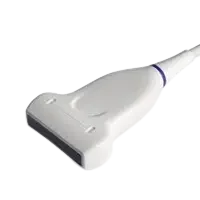
A failing Sonoscape L752 (S/P Series) does not always mean buying a new probe. Use the fault table below to match what you are seeing on screen to a likely cause, then check what a repair assessment would need.
| Manufacturer | Sonoscape |
|---|---|
| Model | L752 (S/P Series) |
| Probe type | Linear array |
| Compatible systems | Sonoscape P50, Sonoscape S40, Sonoscape S8 Expert, Sonoscape S9, Sonoscape S9 Pro |
In service the L752 (S/P Series) is most often found on Sonoscape P50, Sonoscape S40, Sonoscape S8 Expert, Sonoscape S9, Sonoscape S9 Pro. Console-side settings and module revisions still vary, so the exact system build is part of any assessment.
Linear arrays like the L752 (S/P Series) concentrate wear at the lens edges and the cable exit – shallow, high-frequency work means constant handling, and the first faults are usually mechanical rather than acoustic.
Common failure modes for the L752 (S/P Series)
Match what you are seeing against the table below. The right-hand column reflects how faults of this kind typically assess – the actual verdict always depends on the individual probe.
| What you see | Likely cause | Typically repairable? |
|---|---|---|
| Connector lock broken or hardware missing | Broken locking mechanics on the connector housing | Usually repairable |
| Split seams or impact marks on the probe body | A drop or knock; housings are routinely replaced or resealed | Usually repairable |
| Grainy, low-detail image even after presets are checked | A worn lens surface or elements beginning to degrade | Case by case |
| Strain relief pulling away from the cable or gone rigid | Cable flex fatigue at the probe or connector end | Usually repairable |
| Vertical shadowing or missing scan lines on screen | Failed transducer elements or a broken conductor in the cable | Case by case |
| Outer cable sheath showing cracks, kinks or staining | Surface jacket wear – the conductors inside are often still good | Usually repairable |
| Bubbles or lifting at the lens face | Lens delamination from the acoustic stack | Usually repairable |
Check these before you ship the probe
- Photograph the complete manufacturer label – the exact revision matters for parts compatibility.
- Examine the connector for bent or corroded pins, cracks and a working locking mechanism.
- Compare penetration and uniformity against a known-good probe on the same preset.
- Flex the cable gently along its length while imaging – intermittent dropout points to broken conductors.
- Inspect the lens face under good light for cuts, bubbles, lifting edges or discoloration.
Repair, exchange or replace — which applies to your L752 (S/P Series)
For the L752 (S/P Series), think in terms of damage depth: surface and cable-level faults are usually repairable at a fraction of replacement cost; acoustic stack failures are evaluated case by case; extensive element loss generally means replacement. Send the symptoms and photos first – that determines the path before anything ships.
What we need to quote your L752 (S/P Series) repair
- A clear photo of the complete manufacturer and model label on the probe
- A description of the fault: what you see on screen and when it started
- The ultrasound system (console) the probe is used with
- Screenshots or photos of the image problem, if the fault is visual
- Photos of any physical damage – lens, housing, cable or connector
Images shown are representative and are not photographs of an individual unit. Nothing on this page claims OEM authorization or guarantees universal fit. Whether a specific L752 (S/P Series) can be repaired, and on what terms, is confirmed in writing once the probe has been assessed.


